
ADDAC Systems - 504 Probabilistic Generator


€445.00
Net: €373.95
Pre Order 29 October 2026
| U | 3 |
| HP | 10 |
| Depth | 40 |
| +12V | 100 |
| –12V | 40 |
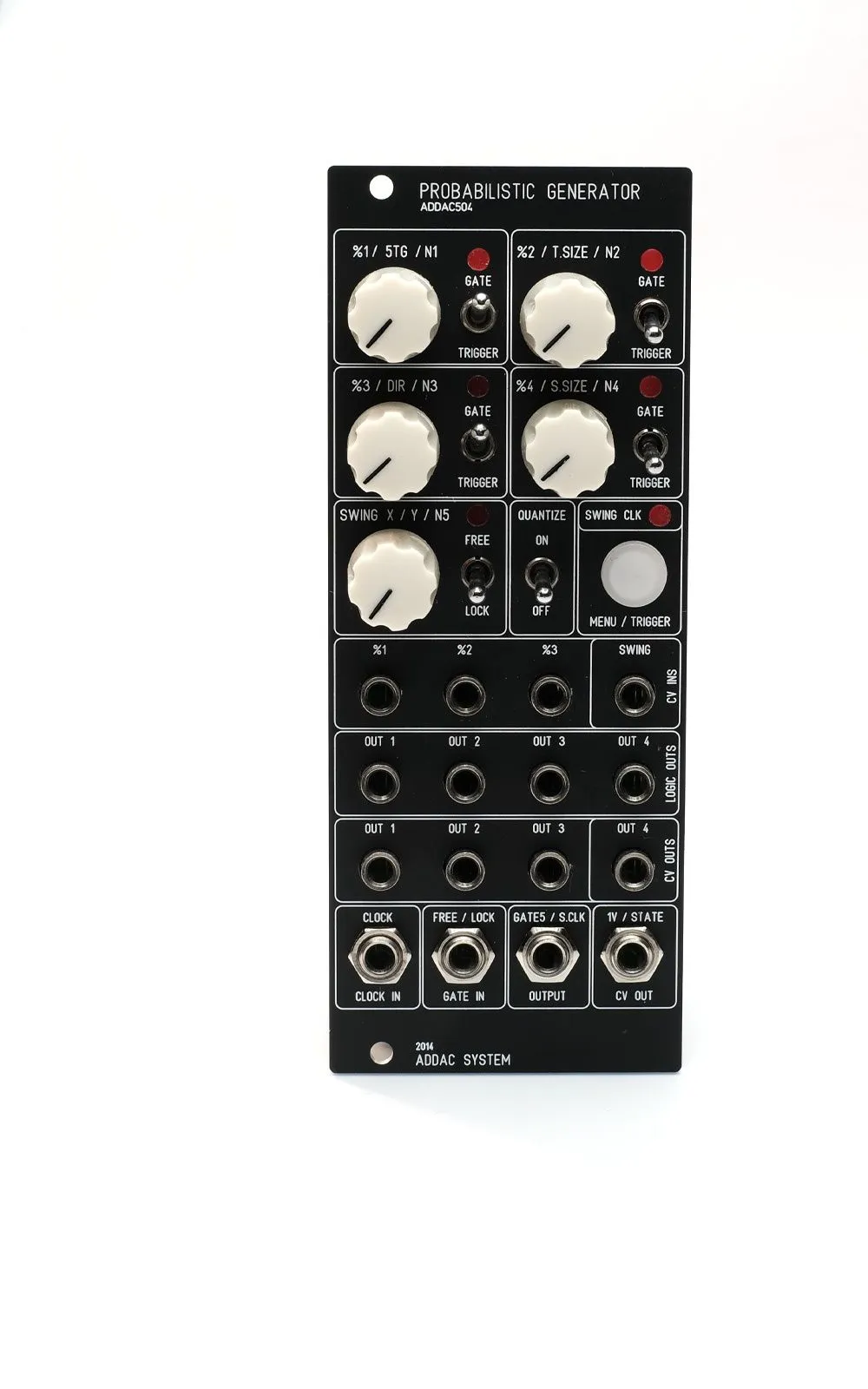
ADDAC504 - Probabilistic Generator
A complex gate/CV generator based on probabilities.
Module Knob Functions
Each of the 5 knobs has 3 different functions, accessed through the Menu/Trigger push-button.
Here are the functions:
Knob 1:
- %1 = Gate 1 Probability
- 5TG = Fifth Output Type: Trigger/Gate
- N1 = Note 1 Tuning
Knob 2:
- %2 = Gate 2 Probability
- T.SIZE = Trigger Size
- N2 = Note 2 Tuning
Knob 3:
- %3 = Gate 3 Probability
- DIR = LOCK Mode Direction: Backwards/Pendulum/Forward
- N3 = Note 3 Tuning
Knob 4:
- %4 = Gate 4 Probability
- S.SIZE = LOCK Mode Sequence Size: up to 16 steps
- N4 = Note 4 Tuning
Knob 5:
- SWING X = Clock Swing X: 1 to 16
- Y = Clock Swing Y: 1 to 16
- N5 = Note 5 Tuning
Gate Outputs Behavior
At every clock input, based on the four knobs' probability settings, the module will select one active gate out—only one of the five gates will be active at all times. All gate outputs can also behave as a trigger instead; trigger size can also be adjusted.
The knobs set the probabilities of each gate being chosen. Here's an example of how this operates:
With all first four knobs at 12 o'clock, the first gate has 50% chance of being chosen. The remaining 50% is passed through to the next knobs. So Gate 2 at 12 o'clock has 50% of the remaining 50% left by setting one, which leaves it with 25% chance of being chosen. The remaining 25% is passed through Knob 3, which will have 12.5% chance of being chosen. The remaining 12.5% is sent to Setting 4, which will have a probability of 6.25%. The remaining percentage left by the 4 settings will always be the probability of Gate 5—in this case, the remaining 6.25%.
Here are a couple more examples:
All knobs at 12 o'clock:
- Setting 1 = 50% chance, 50% left for remaining settings
- Setting 2 = 25% chance, 25% left for remaining settings
- Setting 3 = 12.5% chance, 12.5% left for remaining setting
- Setting 4 = 6.25% chance, 6.25% left for Gate 5
All knobs at 9 o'clock (approximate values):
- Setting 1 = 20% chance, 80% left for remaining settings
- Setting 2 = 16% chance, 64% left for remaining settings
- Setting 3 = 12.8% chance, 51.2% left for remaining setting
- Setting 4 = 10.24% chance, 40.96% left for Gate 5
Tuning and CV Outputs
While in the Tuning page, all knobs can be used to set the 5 pitches. When in tuning page, knobs should be rotated one at a time. While rotating the knobs, CV out 4 will be used as a monitor; the other 3 CV outs will behave normally. The module detects which pot is being rotated and outputs the relative pitch CV on CV out 4 for all knobs. While on this page, the tuning will be quantized or not relative to the panel Quantize on/off switch. Even if this process is done in quantized mode, the module always stores the free value in order to allow quantization to be turned off later. Once tuning is complete, exiting the page stores new values to memory.
When tuning, the module detects both the note selected and the relative octave.
CV Outs Behavior
This is easier to explain with examples.
Let's say these notes are tuned:
- C0 or 0V
- D1 or 1.166V
- F2 or 2.466V
- G3 or 3.583V
- A4 or 4.75V
Example 1: Next logic out calculated is gate 3. CV outs 1-2-3 will output a note in octave 2; the note itself is randomized from the 5 tuned notes (C, D, F, G, A). CV out 4 will output the exact note tuned with knob 3 (F2).
Example 2: Next logic out calculated is gate 5. CV outs 1-2-3 will output a note in octave 4; the note itself is randomized from the 5 tuned notes (C, D, F, G, A). CV out 4 will output the exact note tuned with knob 5 (A4).
Out 1-2-3 is octave related. Out 4 always outputs the original tuned note.
Knob Pages Access
The MENU/TRIGGER button is used to access pages. After power up, it defaults to the first page.
Page 1: MENU/TRIGGER button is off and blinks with clock inputs.
Page 2: Pressing the MENU/TRIGGER button for 3 seconds lights up the button LED, indicating Page 2; changing knobs will affect the secondary function. Releasing the button jumps to Page 1.
Page 3: Pressing the MENU/TRIGGER button for 3 seconds lights up the button LED. Keeping it pressed without moving any knob for 3 more seconds makes the button LED go off. At this time the button can be released. After that, the button will light up indicating Page 3, or the tuning page. Pressing the button once jumps to Page 1.
Soft-Recall and Memory
Knob positions are stored in memory while in operation to enable soft recall of settings. When jumping from page to page, the knob must be rotated until it finds the last setting, and only then does it start to operate. Whenever the pot crosses the last setting point, the MENU/TRIGGER button will blink indicating that the knob is now active.
Page 2 & 3 have permanent memory, so the last settings always load after power up. Page 1 is volatile and powers up with the initial knob settings.
Features:
- 5 gate outputs with selectable trigger or gate behavior
- Adjustable trigger size
- 4 CV outputs with jumper-selectable 0 to +5V or 0 to +10V range
- CV outputs can be quantized or non-quantized
- Jumper-selectable 1V/state or swinged clock output


